


Points - Kids Behavior Tracker
4.281.00 Reviews
App Specs
- Version
- 3.13.3
- Updated On
- License
- Free
- Downloads
- 100,000+
- Developer
- ABDULKADER BADLA
- Categories
- Parenting
- Platform
- Android
Screenshots
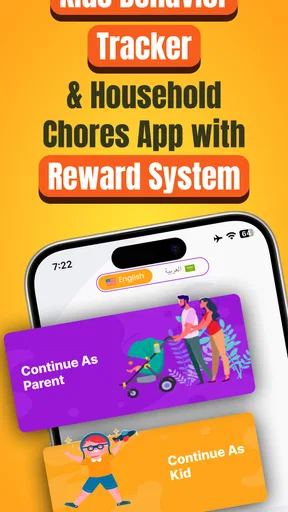
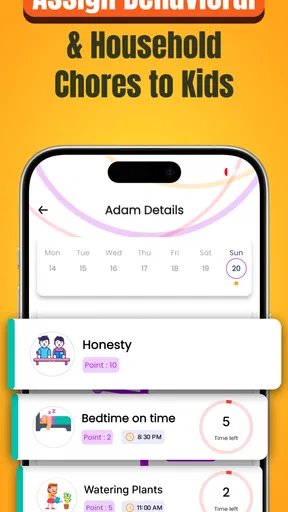
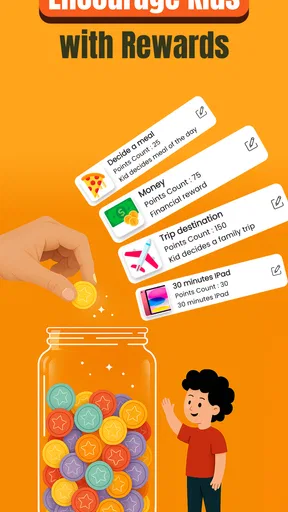

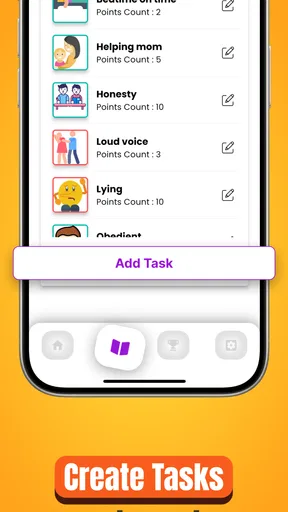
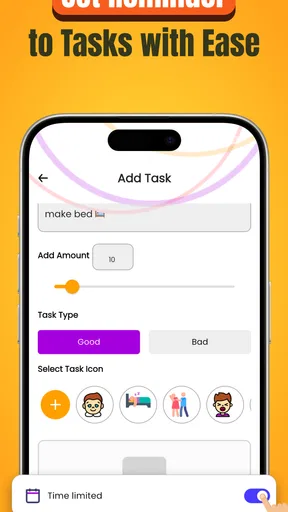
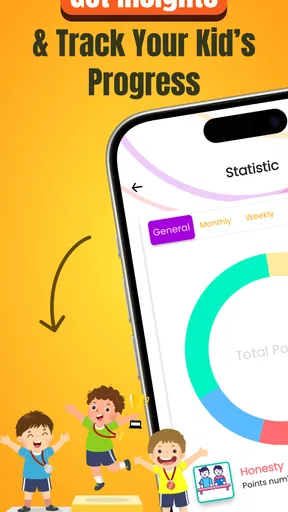
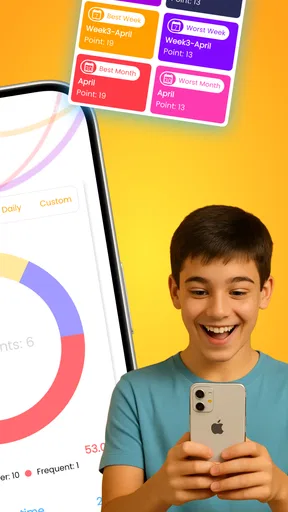
 Analysis by AppCompare
Choosing a behavior tracker is less about finding a perfect parenting system and more about picking one your family can use consistently. I’d start by asking what needs attention: recurring chores, routines that need a reminder, or a child who responds well to visible progress. Points - Kids Behavior Tracker is best suited to families who want to make expectations concrete and celebrate follow-through, rather than keep a complicated record of every part of a child’s day.
It is a free parenting app from ABDULKADER BADLA, with optional in-app purchases ranging from $0.99 to $14.99 per item. Its 4.3 average from around 760 ratings and more than 50,000 installs suggest that many families have tried it, but those figures can’t tell you whether its approach will suit your household. I’d treat the first week as a practical test: choose a few simple goals, agree on what earns points, and see whether tracking reduces reminders or just creates another task for the parent.
Start with a small, fair points plan
The most useful way to begin is to avoid turning every ordinary expectation into a point-earning event. Pick a short list of behaviors that are easy to recognize, such as putting school items away or starting a bedtime routine. If everything earns points, the system can become hard to maintain and children may begin to expect a reward for every small act. A few clear goals make it easier for both parent and child to understand what the tally means.
I’d also decide in advance what counts as “done.” “Clean your room” can mean very different things to a parent and a child; “put books on the shelf and clothes in the hamper” is easier to judge fairly. This little bit of family discussion matters more than clever point values. It lowers the chance of arguments over whether a task was completed and helps the app support a conversation instead of replacing one.
Where a digital tracker has an advantage
Compared with a paper chart on the fridge, a phone-based tally is easier to update when routines happen in different rooms or when another caregiver is helping. The points provide a visible record, which can be useful for a child who needs to see progress rather than hear another reminder. The app’s task-and-reward structure also lets parents shape the system around their own priorities instead of being locked into a preset set of chores.
That flexibility is most valuable when the family keeps the rewards realistic. A small privilege or a choice of a shared activity is often easier to manage than a reward that requires advance planning. I’d make sure a child can understand how far away a reward is, too: if the target feels unreachable, the running total may stop being motivating. Agreeing together on a modest first milestone gives the system a better chance to become a habit.
A weekday routine where it can help
Imagine a school morning that tends to end in a scramble: a child forgets to pack a bag, while a parent repeats the same instructions several times. You could put the relevant routine into a few specific tasks, then add points after each one is completed. The child has a concrete checklist of expectations, and the parent has a consistent way to acknowledge effort. That does not make a busy morning effortless, but it can shift the exchange from repeated nagging toward a clear agreement.
Worth Reading Before You Choose

EA SPORTS FC Mobile 26 Is a Bigger Football Game, but It Takes Time

Flipboard Shows What News Apps Must Do Beyond the Feed

Switching to Android Auto Means Rethinking Your Driving Routine

Google Calendar Makes a Crowded Week Easier to Manage

Ludo King Makes the Most of the Minutes Between Plans

Baby Panda World Brings Quick Play to Modern Phones, but Its Game Library Feels Busy
For this kind of routine, I would avoid awarding points only for speed. A child who is still learning to prepare independently may need time, and rewarding the process can be more useful than turning the morning into a race. It also helps to review the tasks after a few days: if one item is consistently forgotten, it may need a simpler wording or a better place in the routine, rather than a higher point value.
When another approach may fit better
Some families will prefer a physical sticker chart because a child can see it without borrowing a phone or asking an adult to open an app. Others may want a plain checklist, especially if the goal is simply to remember chores and no reward system is needed. A family that already has a routine everyone follows may not gain much by adding points; the extra tracking could feel like administration rather than support.
Points is also not a substitute for talking through behavior that has a more complicated cause. If a child is struggling with a routine because it is confusing, stressful, or beyond their current ability, a points tally alone will not solve that problem. I’d use it for clear, achievable behaviors and keep room for patience, adjustments, and conversation. If the family wants a system centered on detailed schedules or broader household task management, a dedicated planner or chore-list tool may be a closer fit.
Keep the reward system from becoming a negotiation
A useful trade-off with points is that motivation can come from seeing progress, but the reward can also become the only thing a child cares about. To avoid turning every request into a bargaining session, I’d separate the agreed routine from spontaneous demands: tasks and rewards should be discussed calmly, not renegotiated each time a point is added. A reward can be a privilege or a family activity, but it should be something the parent is genuinely willing to provide when earned.
It is worth checking whether the system still feels fair to siblings. The same task may take different effort for children of different ages, so identical point totals do not always mean identical achievement. Parents can tailor expectations, but should explain the reason in simple terms and avoid making the tracker a public scoreboard. The goal is to help each child notice personal progress, not to create a competition that produces resentment.
What to expect before committing
The app is free to start, while optional purchases are available in the app. I would try the basic routine before spending anything, then decide whether the way you use it makes additional options worthwhile. The current version is 3.11.13, and it requires Android 7.0 or later. Its Everyone age rating describes the app’s content classification; it is still a parent-managed tool, so an adult should decide how and when a child participates.
One practical question is whether the system can work when a child is not holding the device. It can, as long as the parent is willing to record completed tasks; the core idea is the tally and the family’s agreement, not handing over a phone as a reward. Another is whether it suits more than one child: the setup described for the app allows profiles for each child, though parents should take care to set goals that feel personal rather than compare totals as if every child had the same routine.
What Exactly is Points - Kids Behavior Tracker?
So, here’s the deal. Points - Kids Behavior Tracker is an app designed to help parents monitor and encourage good behavior in their kids through a points system. Essentially, you can set up various tasks or behaviors you want to track, and assign points to each. As your child completes these tasks, they earn points, which can be redeemed for rewards. Sounds simple, right? But wait, there's a bit more to it.
Getting Started: The Setup
First things first, the setup is a breeze. I downloaded the app from the App Store, and within minutes, I was up and running. The app is intuitive, with a user-friendly interface that guides you through the process of setting up profiles for each child. You can personalize everything from the tasks to the rewards, making it super tailored to your family’s needs.
Creating Tasks and Rewards
This is where the fun really begins! You can create a list of tasks or behaviors that you want to encourage. Whether it’s "make your bed," "finish homework," or "brush teeth," you set the points for each task. The reward system is equally flexible. Maybe your kiddo wants an extra 30 minutes of screen time or a day out at the zoo. You set the rewards and decide how many points are needed to earn them. It’s a fantastic way to personalize the experience and keep kids motivated.
Tracking Progress
The app offers a neat and organized way to track each child’s progress. Every time they complete a task, you add the points, and the app keeps a running tally. There’s something incredibly satisfying about seeing those points add up, both for you and your child. It’s like watching a piggy bank fill up, but with behavior points!
Encouraging Positive Behavior
One of the standout features of the app is how it fosters positive behavior. By focusing on what kids are doing right and rewarding them for it, it encourages them to keep up the good work. This positive reinforcement can be a game-changer in the tumultuous world of parenting. It turns daily chores and responsibilities into a fun game, which is a win-win in my book.
Room for Improvement
While Points - Kids Behavior Tracker is a gem, there’s always room for improvement. I found myself wishing there were more customizable options for rewards. Sometimes the rewards my kids want are a bit unconventional, and it would be nice to have more flexibility in the app to accommodate that. Also, a feature to track negative behavior and deduct points could add an extra layer of depth.
Final Thoughts: Why You Should Give It a Try
All in all, Points - Kids Behavior Tracker is a fantastic tool for parents looking to encourage and track their kids' behavior in a positive and engaging way. It’s like having a digital star chart in your pocket, with a whole lot more ease and customization. If you’re tired of nagging and want a more positive solution, this app might just be your new best friend.
So, next time you find yourself overwhelmed with the day-to-day tasks of parenting, consider giving this app a whirl. It might not be a magic wand, but it’s definitely the next best thing. Happy tracking!
My recommendation for the right household
I’d recommend giving it a try if your main challenge is remembering and reinforcing a handful of everyday behaviors, and you’re comfortable being the person who records progress. The app is most useful when the parent and child agree on the rules before a task is done. That prevents points from feeling arbitrary and makes it easier to explain why a reward has or has not been earned.
I would skip it if you want a fully hands-off system, a detailed family calendar, or a tool that resolves disagreements without parental judgment. A points tracker can make expectations more visible, but it cannot decide whether a child had a difficult day or whether a task was reasonable under the circumstances. In those moments, flexibility matters more than keeping the tally perfectly consistent.
For me, the strongest reason to use it is its straightforward link between an agreed action and visible progress. Its biggest caution is the same simplicity: parents still need to choose sensible tasks, keep rewards manageable, and resist adding so many rules that tracking becomes a chore of its own. Start small, review whether the routine is genuinely helping, and adjust or stop if it creates more friction than encouragement.
Pros
- Simple and intuitive user interface.
- Customizable tracking categories.
- Encourages positive behavior reinforcement.
- Secure data management and privacy.
- Easy progress visualization with charts.
Cons
- Limited free version features.
- No offline mode available.
- Occasional sync issues reported.
- Requires frequent manual entry.
- Lacks integration with other apps.
FAQs for Points - Kids Behavior Tracker
What is Points - Kids Behavior Tracker?
Points - Kids Behavior Tracker is an app designed to help parents and educators monitor and encourage positive behavior in children. The app allows you to assign points for good behavior and set rewards for reaching certain milestones. It’s a fun and interactive way to motivate kids to develop healthy habits.
How does the Points system work in the app?
The Points system in the app allows parents to assign points to specific behaviors or tasks completed by the child. These points can be accumulated over time and redeemed for rewards. This system helps children understand the value of positive actions and motivates them to strive for good behavior consistently.
Is Points - Kids Behavior Tracker suitable for all ages?
The app is primarily designed for children aged 4 to 12, but it can be adapted for older kids as well. The customization options allow users to tailor the behavior tracking and rewards system to fit the developmental stage and interests of any child, making it versatile for a range of ages.
Can multiple children be tracked at once on the app?
Yes, Points - Kids Behavior Tracker supports multiple profiles, allowing parents to track the behavior of several children simultaneously. Each child can have a personalized profile with individual goals and rewards, making it easy to manage and monitor progress for each child separately.
Is there a cost associated with using the app?
The basic version of Points - Kids Behavior Tracker is free to download, but it may offer in-app purchases for additional features or customization options. These purchases can include premium themes, additional reward options, or expanded tracking capabilities, providing users with a more enriched experience.


